 PackDial
PackDial: an Android app for JBD, JK and Daly BMS
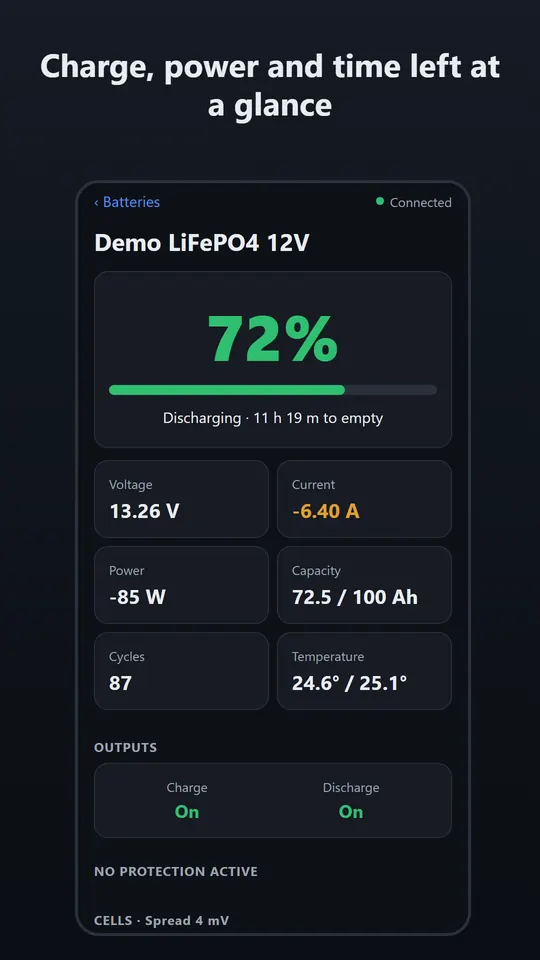
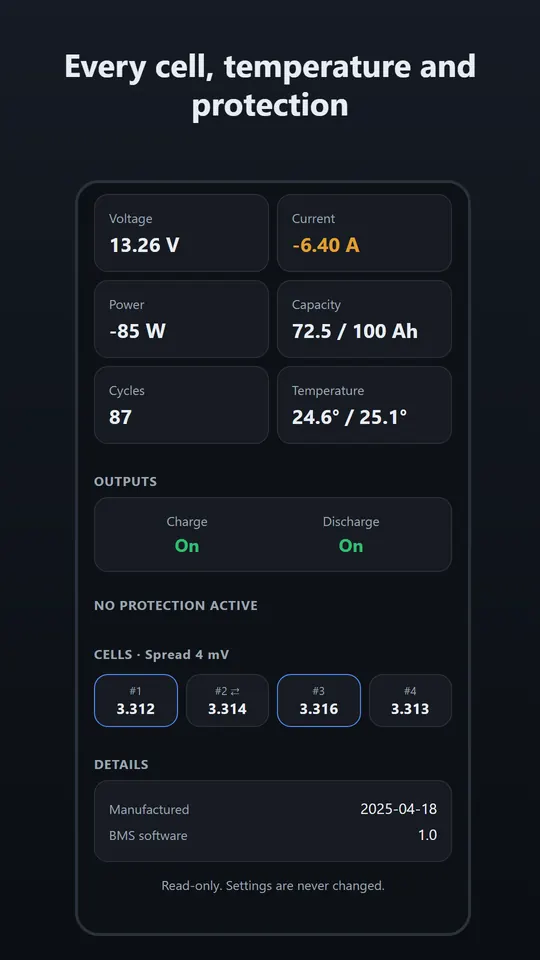
PackDial reads the smart BMS of your lithium (LiFePO4) battery over Bluetooth and shows charge, cell voltages, temperatures and protections on your phone. It only reads; it never changes BMS settings.
Get PackDial on Google PlayFree · Android · one small banner ad · no account
Supported BMS
After connecting, PackDial looks at which Bluetooth service the battery offers and picks the matching protocol. It does not go by the battery's brand name, so a pack sold under another brand should be readable if its board uses one of these protocols.
| BMS family | Protocol PackDial reads | Bluetooth (BLE) | How we checked |
|---|---|---|---|
| JBD (Jiabaida) – boards used with the “Xiaoxiang” app | JBD read requests for basic info, cell voltages and board name | Service FF00 (notify FF01, write FF02) | Against a published answer from a real 4-cell pack |
| JK (Jikong) smart BMS | JK02 protocol: “device info” and “cell info” requests; field layouts for firmware before 11 and from 11 on | Service FFE0 (characteristic FFE1) | Against public sample data for five firmware versions (10.08, 11.48, 15.38, 19.05, 19.27) |
| Daly smart BMS | MODBUS “read registers”, two generations (device address 0xD2 and 0x81) | Service FFF0 (notify FFF1, write FFF2) | Against public sample data for both generations |
Not checked: we have not yet tested PackDial on a real battery ourselves. The protocols above were checked against public sample data from the open-source aiobmsble project. Batteries differ by model and firmware, so a board with the same brand name may use a different protocol that PackDial does not read. If yours does not work, please tell us.
What you can see
| Reading | JBD | JK | Daly |
|---|---|---|---|
| State of charge (%) | Yes | Yes | Yes |
| Voltage, current, power (V × A) | Yes | Yes | Yes |
| Remaining capacity (Ah) | Yes | Yes | Yes |
| Full capacity (Ah) | Yes | Yes | Not read |
| Time left to empty (discharging) | Yes | Yes | Yes |
| Time left to full (charging) | Yes | Yes | No (needs full capacity) |
| Every cell voltage, and the spread between highest and lowest cell (mV) | Yes | Yes | Yes |
| Balancing | Per cell | On / off | On / off |
| Temperatures | All sensors the BMS reports | Battery sensors (MOSFET sensor not shown) | Battery sensors, up to 8 (MOSFET sensor not shown) |
| Charge and discharge switch state (on / off) | Yes | Yes | Yes |
| Protections | By name (13 kinds) | Alarm code | Alarm code |
| Cycle count | Yes | Yes | Yes |
| BMS software version | Yes | Yes | Yes |
| Manufacturing date | Yes | No | No |
JBD protections by name: cell over/under voltage, pack over/under voltage, too hot or too cold to charge or discharge, charge and discharge overcurrent, short circuit, front-end chip error, output switches locked. For a JK or Daly alarm code, check the battery maker's manual.
Readings refresh every few seconds while the battery screen is open. PackDial does not keep a history and does not send alerts.
Read-only: PackDial never changes BMS settings
PackDial sends only the read requests of each protocol: for JBD the three “read” registers, for Daly only MODBUS function 03 (read), for JK only “device info” and “cell info”. It has no screen for settings and cannot turn charging or discharging on or off. The app's automated tests check that nothing else can be sent.
PackDial shows what the BMS reports. It is a display, not a safety device, and it does not replace the BMS's own protection or the battery maker's instructions.
How to connect
- Install PackDial from Google Play and open it.
- Close the battery maker's app. Only one app can be connected to the battery at a time. Stay near the battery.
- Tap Scan for batteries and allow Nearby devices (Android 12 and later). On Android 11 and older, allow Location and turn Location on; older Android needs it for any Bluetooth scan.
- Tap your battery in the list. Not there? Tap Show all Bluetooth devices.
- The battery is saved under My batteries, so next time it is one tap. If the connection drops, PackDial reconnects by itself, and again as soon as you come back to the app.
No battery at hand? Tap Try demo to see the screens with a simulated battery.
FAQ
Is PackDial an alternative to the official JBD (Xiaoxiang), JK or Daly app?
It is made for watching your battery: PackDial reads the same kind of Bluetooth data and shows charge, cells, temperatures and protections, for all three BMS families in one app, with no account. We have not yet tested it on a real battery ourselves; the protocols were checked against public sample data. It is read-only, so it cannot change settings or switch charging and discharging. For setup and configuration, use the BMS maker's app.
PackDial does not find or connect to my battery. What can I do?
- Close the official BMS app (only one app can be connected at a time).
- Keep the phone near the battery and check that Bluetooth is on.
- Check the permission: Nearby devices on Android 12 and later; Location on Android 11 and older, with Location turned on. If you refused it for good, the app shows Open settings.
- If the battery is not in the list, tap Show all Bluetooth devices. The list first shows only devices whose name or Bluetooth service looks like a battery.
- If the app says “This device does not offer a supported battery connection”, the board does not use one of the protocols above. Please tell us the model.
My BMS is not supported. How can I ask for it?
Email support@runwith-ai.com with the battery brand and model, the BMS brand if you know it, the Bluetooth name shown in the scan list, and the app the maker recommends.
Does my battery data leave my phone?
No. Battery readings are read over Bluetooth and only shown on your screen. The list of batteries you opened (Bluetooth address, name, last used) is stored only on your phone and is deleted when you uninstall the app. There is no account and no analytics, and reading the battery works without internet. The one banner ad is provided by Google AdMob, which sends information such as your advertising ID and IP address to Google to show the ad. Details: privacy policy.
Does PackDial have ads?
Yes. There is one small banner ad at the bottom of the screen. In the EEA, the UK and Switzerland (and other places where the law requires it), Google's consent form is shown first. Where the consent form applies, Ad privacy choices on the first screen lets you change your choice.
How much does PackDial cost?
PackDial is free on Google Play. All features work without a purchase or a subscription.
Is there an iPhone version?
No. PackDial is available for Android on Google Play.
Which languages does the app use?
English, Japanese, German, French and Dutch, following your phone's language.